

Electronic Instructions for Use (eIFU)
Reliability begins with knowledge – Please refer to the instructions for use.

Troubleshooting and Tips
Proper maintenance and cleaning of your Bluephase is essential for the longevity of your product.
Never clean the Bluephase if the battery and light guide have been removed and avoid using too much cleaning fluid. Moisture can penetrate the housing and cause damage to the electronics and reflector. This can lead to a defect and also to a loss of light output.
In the video we show you how to clean your Bluephase optimally.
Cause
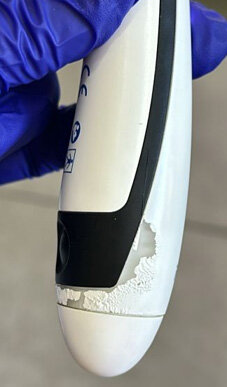
The paint on the handpiece will wear off if too much cleaning agent is used or if the handpiece is placed in the charging base damp or wet.
Solution
Follow the cleaning instructions for the Bluephase in the instructions for use. Do not use any cleaning agents that are too intensive and only place the handpiece in the charging station when it is dry. You can find detailed instructions and important information in the article Maintenance and Cleaning
The Bluephase handpiece can still be used as the functionality of the device is not affected. Only the paint on the handpiece has come off.
Cause
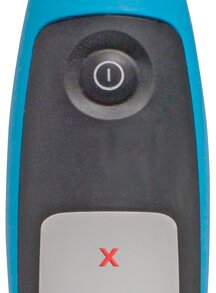
The device is overheated
Solution
Allow the device to cool down and try again after certain time.
If the error persists, please contact the Customer Care team.
Cause
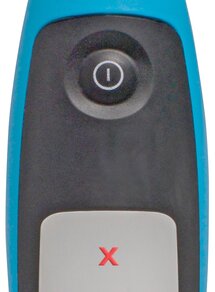
Electronic component of the handpiece is defective.
Solution
Remove and reinsert the battery
If the error persists, please contact the Customer Care team.
Causes
1. Battery empty
2. Battery contacts dirty

Solution
1. Place the device in the charging base and charge it.
2. Remove battery and clean the battery contacts. Caution: Only clean the battery contacts, not the contacts inside the Bluephase handpiece, with a damp cloth or cotton swab.

If the error persists, please contact the Customer Care Team.
Cause
Due to regulations, batteries may only be partially pre-charged during shipping. If the charge level falls below a certain value over a longer period of time, the battery may become deeply discharged. This may give the impression that the battery is not working when it is inserted into the Bluephase device and is to be used immediately.
Solution
1. Insert the battery into the handpiece and place it in the charging base.
2. Wait until the charging base indicator starts blinking blue and the handpiece displays the charging symbol (indicating that the battery is charging). Based on experience, this may take up to 20 minutes.
3. Fully charge the battery before using it for the first time (display of the charging base is black).
The charging process cancels the deep discharge and the Bluephase can be used as usual.
If the display of the charging station remains black for a longer period of time and the handpiece does not display the charging symbol, please contact the Customer Care Team.
Cause
It can happen that the Bluephase no longer works after a longer period of non-use (e.g. practice holiday). This is especially the case if the device has been disconnected from the power supply during this time.
This can lead to a deep discharge of the Bluephase battery, which means that the device will not work immediately.
Solution
1. Connect the charging base to the power supply.
2. Remove the battery from the handpiece, plug it back in and insert the handpiece into the charging base
3. Wait until the charging base indicator starts blinking blue and the handpiece displays the charging symbol (indicating that the battery is charging). Based on experience, this may take up to 20 minutes.
4. Fully charge the battery (the charging station display is black).
If the display of the charging base remains black for a longer period of time and the handpiece does not display the charging symbol, contact the Customer Care Team.
Cause
1. Power cord not connected
2. Battery fully charged
Solution
Check if the charging base is connected to the power supply by means of the power cord.
Causes
1. Charging base does not recognise the battery
2. Battery empty
3. Electronic component is defective
Solution
1. Remove the handpiece from the charging base and place it back again
2. Remove and reinsert the battery and place the handpiece in the charging base
If the error persists, please contact the Customer Care team.
We recommend checking the light intensity emitted by the curing light at regular intervals using Bluephase Meter II in order to be sure that the materials are adequately cured and the composite fillings are of a high and lasting quality.
Please ensure that a Bluephase Meter II from the series with serial number 1300010467 or higher is used. Devices with a lower serial number are not compatible with the Bluephase EasyCure and will produce incorrect measurement results.
Further information on determining the light intensity can be found in the instructions for use.
Make the most of your potential – with our Academy.

Your feedback is important to us!
Still looking for a solution? We're here for you – our Customer Care Team is just one click away.

Phone: +18009225520

E-mail: customercare.na@ivoclar.com